Otter vs Fireflies (November 2026): Pricing, Limits, Languages and Privacy Compared
Disclosure: this comparison contains no affiliate links today. Every Otter.ai and Fireflies.ai link below is a plain link, and we earn nothing if you sign up for either. If that changes, this line will change with it. See our affiliate disclosure. Editorial placement is decided on merit and is not for sale.
By Lennit Herrera, founder and editor, AI Tool Stack Reviews · Last updated November 5, 2026
The verdict: in the Otter vs Fireflies choice, Otter is the better buy for one person or a small team that works in English and wants the cheapest paid plan: Otter Pro is $8.33 a user a month on annual billing, against $10 a seat for Fireflies Pro. Fireflies is the better buy if you need more than six languages, longer recordings on the entry plan, or a free plan without a monthly minutes cap: it transcribes in 100+ languages, records up to 2 hours per meeting on Free and Pro (Otter Pro stops at 90 minutes), and its security page says it does not train on your data by default, where Otter’s privacy policy says it trains on de-identified recordings. On team plans the two are close to level: Fireflies Business is $19 a seat on annual billing, Otter Business $19.99.
Every plan, price and limit below was read on Otter’s and Fireflies’ own pricing pages on November 5, 2026. Privacy statements were read the same day on Otter’s privacy policy and Fireflies’ security page. Lawsuit details come from the court complaint and NPR’s report, both linked below. We do not test meeting tools ourselves, so this page makes no accuracy or speed claims; it compares what each company publishes.
On this page
- Otter vs Fireflies: quick comparison
- Pricing, plan by plan
- What a year costs for 1, 5 and 10 people
- Free plans: which is more usable?
- Recording limits, minutes and languages
- AI features and how each one meters them
- Privacy and training on your recordings
- Consent, and the lawsuits against both
- Which should you choose?
- How we compared them
- Frequently asked questions
Otter vs Fireflies: quick comparison
Both are AI notetakers: a bot joins your Zoom, Google Meet or Microsoft Teams call, records it, and hands back a transcript, a summary and action items. The differences are in the caps, the languages and what each company does with your recordings.
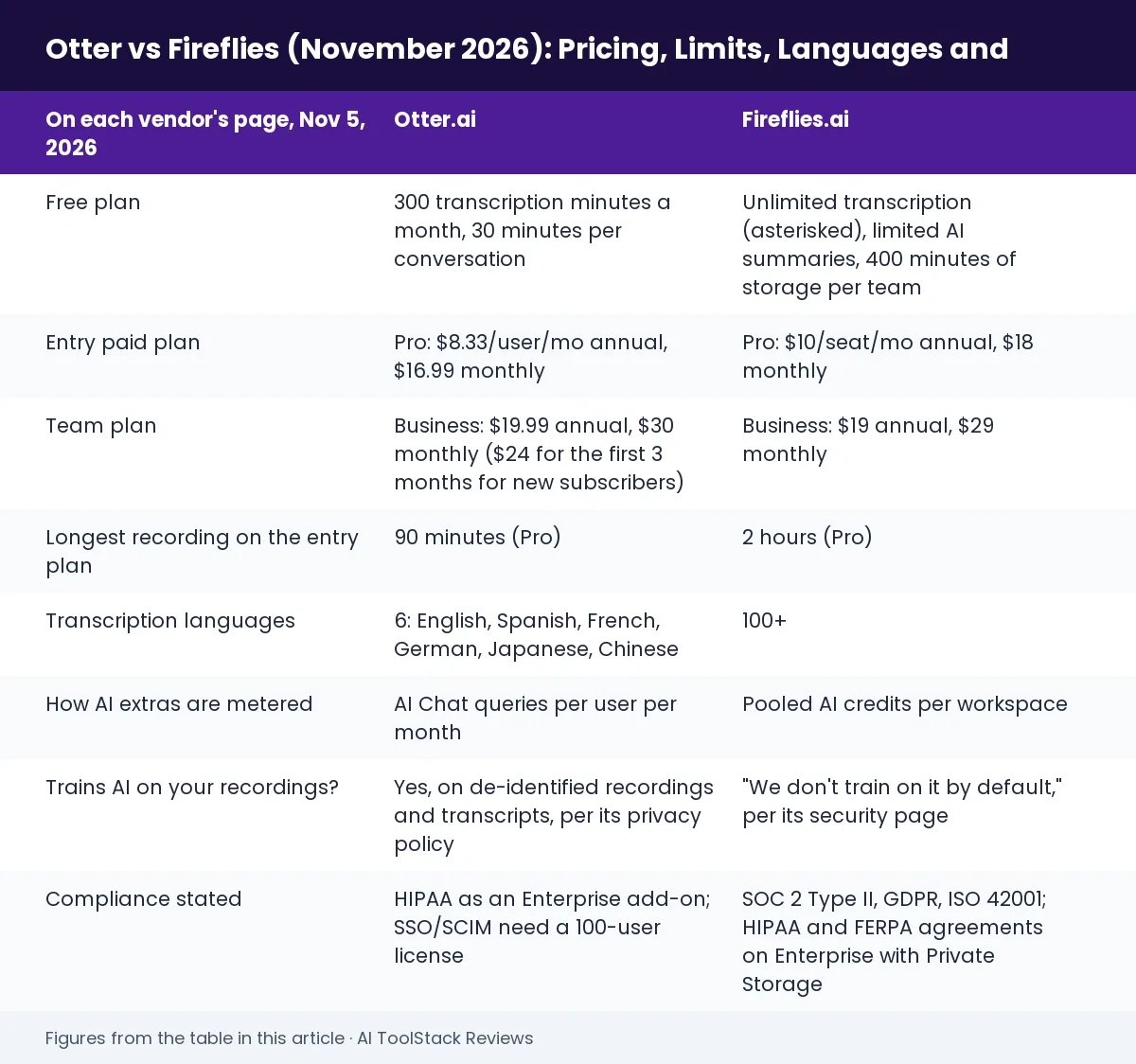
| On each vendor’s page, Nov 5, 2026 | Otter.ai | Fireflies.ai |
|---|---|---|
| Free plan | 300 transcription minutes a month, 30 minutes per conversation | Unlimited transcription (asterisked), limited AI summaries, 400 minutes of storage per team |
| Entry paid plan | Pro: $8.33/user/mo annual, $16.99 monthly | Pro: $10/seat/mo annual, $18 monthly |
| Team plan | Business: $19.99 annual, $30 monthly ($24 for the first 3 months for new subscribers) | Business: $19 annual, $29 monthly |
| Longest recording on the entry plan | 90 minutes (Pro) | 2 hours (Pro) |
| Transcription languages | 6: English, Spanish, French, German, Japanese, Chinese | 100+ |
| How AI extras are metered | AI Chat queries per user per month | Pooled AI credits per workspace |
| Trains AI on your recordings? | Yes, on de-identified recordings and transcripts, per its privacy policy | “We don’t train on it by default,” per its security page |
| Compliance stated | HIPAA as an Enterprise add-on; SSO/SCIM need a 100-user license | SOC 2 Type II, GDPR, ISO 42001; HIPAA and FERPA agreements on Enterprise with Private Storage |
| Check it yourself | Otter pricing → | Fireflies pricing → |
Want the full story on one tool? Our Otter.ai review and Fireflies.ai review cover each in depth; this page is the head-to-head.
Pricing, plan by plan
Both sell four tiers: a free plan, an individual plan, a team plan and Enterprise. Both charge far less per month when you pay for a year up front, so compare like with like.
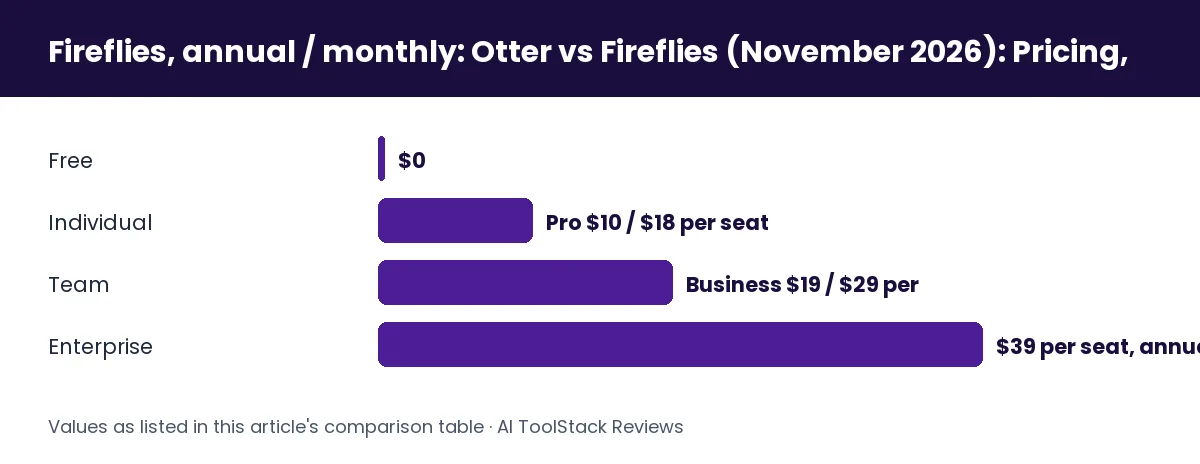
| Plan | Otter, annual / monthly | Fireflies, annual / monthly |
|---|---|---|
| Free | $0 (Basic) | $0 |
| Individual | Pro $8.33 / $16.99 per user | Pro $10 / $18 per seat |
| Team | Business $19.99 / $30 per user | Business $19 / $29 per seat |
| Enterprise | Quote only | $39 per seat, annual only |
Three details from the two pages change the headline numbers:
- Otter’s team-size caps. Otter’s plan table limits workspaces to 5 billed users on Pro and 25 on Business; Enterprise is unlimited. A sixth person on Pro means moving everyone to Business. Fireflies prices per seat with no seat cap stated on its plan cards, and offers volume discounts above 50 members.
- Otter’s monthly Business offer. On monthly billing Otter shows Business at $30 with “20% off for 3 months,” which is $24 for the first three months; a footnote limits the offer to first-time subscribers. After that it is $30.
- Otter’s education price. Otter’s FAQ offers 20% off Pro to students and teachers with a .edu email: $6.67 a month billed $79.99 a year, or $13.59 monthly.
What a year costs for 1, 5 and 10 people
This is our arithmetic from the per-seat prices above, on annual billing, before any tax.
| Team size, annual billing | Otter | Fireflies |
|---|---|---|
| 1 person, entry plan | Pro: about $100 | Pro: $120 |
| 5 people, entry plan | Pro: about $500 (the 5-user Pro maximum) | Pro: $600 |
| 5 people, team plan | Business: $1,199 | Business: $1,140 |
| 10 people, team plan | Business: $2,399 (Pro not allowed above 5) | Business: $2,280, or Pro: $1,200 |
The pattern: Otter is cheaper for up to five people on the entry plan; Fireflies is cheaper once a team outgrows five, because Fireflies lets a 10-person team stay on Pro at $10 a seat, while Otter’s 5-user Pro cap forces a 10-person team onto Business at $19.99. Whether Pro is enough for that team depends on the limits below, so check them before you count the saving.
Free plans: which is more usable?
Fireflies’ free plan is the more generous on transcription; Otter’s is the more predictable.
Otter Basic gives each user 300 transcription minutes a month, with each conversation capped at 30 minutes, only the 25 most recent conversations kept in your history, and 3 file imports for the life of the account. That is enough to try it on a few short calls a week, not to run your meetings on it.
Fireflies Free lists unlimited transcription with an asterisk, limited AI summaries, recordings up to 2 hours, and 400 minutes of storage for the whole team. The storage line is the real limit: 400 minutes is under seven hours of meetings kept at any one time, shared by everyone on the free workspace. Fireflies’ FAQ adds that paid tiers get “more transcription credits along with advanced exporting capabilities” and app and CRM integrations.
If you want to test both properly, start the free plans in the same week on the same kind of call and see which output you actually use.
Recording limits, minutes and languages
Otter’s approach: metered minutes
Otter counts minutes. Pro gives 1,200 transcription minutes per user a month (a shared pool across meeting and imported-file transcription, with no rollover), 90 minutes per meeting and 10 file imports a month. Business removes the monthly meeting cap (“unlimited meetings”), raises imported-file transcription to 6,000 minutes per user, allows 4 hours per meeting and lets the bot sit in 3 meetings at once, against 2 on Pro and 1 on Basic.
Fireflies’ approach: unlimited transcription, capped length and storage
Fireflies does not meter transcription minutes: every plan lists unlimited transcription (the free plan’s with an asterisk), and its FAQ says Pro and Business users face no monthly limits on the meeting bot or the Chrome extension, with rate limits only on the API, dialers and bulk uploads. The caps are recording length (2 hours on Free and Pro, 3 hours on Business, 4 hours on Enterprise) and storage (8,000 minutes per seat on Pro, unlimited on Business and Enterprise).
Languages: the clearest difference
Otter’s pricing page lists transcription in six languages: English, Spanish, French, German, Japanese and Chinese. Fireflies lists 100+ languages on every plan, and its Business plan adds a “Multi-language Mode.” If any of your calls are in Portuguese, Hindi, Arabic or Korean, the decision is made for you: Fireflies.
Recording without a bot
Fireflies’ Chrome extension can record “without Fireflies bot,” per its pricing page, which helps when a meeting host blocks notetaker bots. Otter offers live transcription in its own iOS, Android and web apps, which suits in-person meetings and lectures recorded on a phone; it also has a Chrome extension (covered in our Otter review).
AI features and how each one meters them
Both produce automatic summaries and action items. The difference is how they ration the extra AI features.
Otter rations its AI Chat assistant by queries: 20 a month on Basic (3 per conversation), 50 on Pro and 200 on Business and Enterprise, per user. Custom AI meeting templates are capped at 5, 15 and 30 meetings per user on Basic, Pro and Business. Otter also lists an MCP server, so AI assistants can read your Otter meetings, and Salesforce and HubSpot sync for 1 user on Basic, 5 on Pro and unlimited above.
Fireflies rations its newer features with AI credits: 20 on Free and Pro, 30 on Business, 50 on Enterprise, per its pricing page. When we read its billing guide for our Fireflies review (October 11, 2026), it said the credits are a one-time grant pooled across the whole workspace, so ten Business seats share 30 credits, not 300; that summaries, transcription and recap emails never use credits; and that once they run out you are offered a paid credits plan. The core job of recording, transcribing and summarising does not run out. The extras (AI Skills, assistants, voice agents) do.
The plain read: Otter’s limits are per person and reset monthly; Fireflies’ extras are shared and do not refill. A heavy user of AI chat across many meetings will hit Fireflies’ credit wall sooner than Otter’s monthly query cap.
Privacy and training on your recordings
Meeting audio is some of the most sensitive data a company has, and this is where the two companies’ published statements differ most.
Otter’s privacy policy (effective June 16, 2026, read November 5) lists, among its uses of data, “training our proprietary AI technology on de-identified audio recordings and on transcriptions (which may contain Personal Information).” Its terms, as we read them on October 22 for our Otter review, also say the service may process voiceprints to recognise users and tag their names in transcripts. Read the privacy policy and terms yourself.
Fireflies’ security page (read November 5) says: “You own your data. We don’t train on it by default,” and describes a zero-day data retention policy with its vendors. It states it is certified for GDPR, SOC 2 Type II and HIPAA compliance and for ISO 42001, and that HIPAA and FERPA agreements are “available on Enterprise with Private Storage.” Read the security page and privacy policy.
For regulated work (health, legal, education), neither company’s lower tiers are the answer: Otter’s HIPAA option is an Enterprise add-on, and Fireflies’ agreements sit on Enterprise. Get the agreement in writing before you record a patient or client call. Our AI tools for lawyers guide covers the confidentiality side in more depth.
Consent, and the lawsuits against both
A meeting bot records everyone on the call, not only the person who invited it. Recording-consent laws differ by US state and by country, and in some places every participant has to agree. Both companies have been sued over exactly this.
- Otter: in August 2025, NPR reported a proposed class action filed in the US District Court for the Northern District of California, alleging Otter’s notetaker records meetings without the informed consent of attendees.
- Fireflies: on December 18, 2025, a putative class action was filed in the US District Court for the Central District of Illinois (case 3:25-cv-03399; read the complaint), alleging its speaker identification creates voiceprints of participants without the consent Illinois’ Biometric Information Privacy Act requires.
Both are allegations, not findings, and we have not found a ruling or settlement in either. We list them because they show the same practical risk with either tool: tell people a notetaker is on the call, and turn off auto-join for meetings with outsiders unless they have agreed. This is not legal advice.
Which should you choose?
Choose Otter if…
- You are one person, or a team of five or fewer, and want the cheapest paid plan ($8.33 a month on annual Pro).
- Your meetings are in English or one of Otter’s other five languages, and under 90 minutes.
- You record in person on your phone (lectures, interviews) as much as on Zoom.
- You are a student or teacher with a .edu address ($6.67 a month on annual Pro).
Choose Fireflies if…
- Any of your calls are in a language Otter doesn’t list; Fireflies lists 100+.
- Your meetings run past 90 minutes, or you want a free plan with no monthly minutes cap.
- You do not want your recordings used to train the vendor’s AI by default.
- Your team is more than five people and Pro features are enough ($10 a seat, no 5-user cap).
Watch out for, with either one: Otter’s 5-user Pro cap and its training-on-de-identified-data policy; Fireflies’ 400-minute storage on Free and its one-time, pooled AI credits. And with both, the consent question above is yours to handle, not the bot’s.
See Otter’s plans → See Fireflies’ plans →
If neither fits, our best AI meeting note takers roundup covers the wider field, and if you mostly transcribe recorded interviews rather than live calls, the AI transcription tools comparison and our Descript review cover editing-first tools. For keeping and searching notes once the meeting is over, see Mem AI vs Notion AI.
How we compared them
We compared Otter.ai and Fireflies.ai across their 8 published plans (four each) on the same day, November 5, 2026, using only each company’s own pages: Otter’s pricing page, plan table, education FAQ and privacy policy, and Fireflies’ pricing page, plan table, FAQ and security page. The AI-credit rules come from Fireflies’ billing guide as read for our review on October 11, 2026, and are dated as such. The two lawsuits are cited from the court complaint and NPR’s report.
We do not test meeting tools ourselves, and we have not measured either tool’s transcription accuracy, so there are no accuracy or speed claims on this page. Where the two pages describe a feature differently, we quote each company’s own wording rather than judge which is better.
Frequently asked questions
Is Otter or Fireflies better?
Neither wins everywhere. Otter is cheaper for one to five people on its entry plan ($8.33 vs $10 a month, annual) and offers a student price. Fireflies supports far more languages (100+ vs 6), records longer meetings on its entry plan (2 hours vs 90 minutes), and says it does not train on your data by default.
Is Otter cheaper than Fireflies?
On the individual plan, yes: Otter Pro is $8.33 a user a month billed annually or $16.99 monthly, against Fireflies Pro at $10 or $18. On team plans Fireflies is slightly cheaper ($19 vs $19.99 a seat, annual), and above five people Fireflies Pro at $10 a seat undercuts Otter, whose Pro plan stops at five users.
Which has the better free plan, Otter or Fireflies?
Fireflies, if you mainly need transcripts: it lists unlimited transcription and 2-hour recordings, but only 400 minutes of storage per team. Otter’s free plan caps you at 300 minutes a month and 30 minutes per conversation, and keeps only your 25 most recent conversations.
Does Otter or Fireflies use my recordings to train AI?
Otter’s privacy policy says it trains its AI on de-identified audio recordings and transcriptions. Fireflies’ security page says it does not train on your data by default and describes zero-day retention with its vendors. Read both documents for your own case.
Can Otter or Fireflies record without joining as a bot?
Fireflies’ Chrome extension records without its bot, per its pricing page. Otter records in its own web and mobile apps, which works for in-person meetings, and also offers a Chrome extension.
Is Otter or Fireflies HIPAA compliant?
Only on Enterprise. Otter lists HIPAA compliance as an Enterprise add-on; Fireflies says HIPAA and FERPA agreements are available on Enterprise with Private Storage. Get a signed agreement before recording protected health information.
Which supports more languages?
Fireflies, by a wide margin: 100+ languages on every plan. Otter lists six: English, Spanish, French, German, Japanese and Chinese.
Bottom line
For a solo user or a small English-speaking team counting dollars, Otter Pro is the cheaper start, and the student price is the best deal either company offers. For multilingual teams, long meetings, teams over five, or anyone who does not want their recordings feeding a vendor’s AI, Fireflies is the stronger fit at a similar team price. Try both free plans on the same calls before you pay for either.
This page is for information, not legal or compliance advice. Plans and prices change; confirm on Otter’s and Fireflies’ own pages before you buy.
About the author. Lennit Herrera founded AI Tool Stack Reviews to compare AI tools using the vendors’ own published pricing and documentation. The site does not run controlled tests of the products it covers, and says so on every page. More about this site.